Happylivia
Calm, ad-free games for young children
Happylivia makes Android games for children aged 2 and up. There are two so far, and both work the same way: you pay once, and nothing inside them asks your child for money, attention or data.
Our games
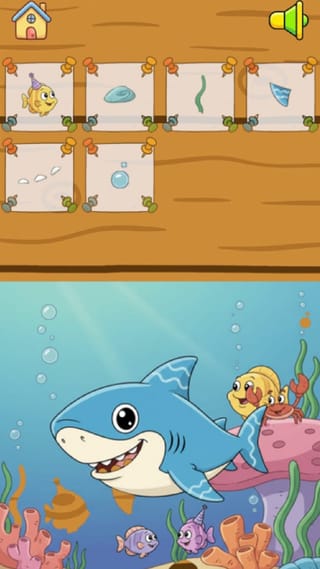

Sticker puzzles · ages 2 to 8
Sticker Builder
A picture appears with pieces missing, and your child drags each sticker to the spot where it belongs until the scene is complete. There is no timer, no score and no way to lose.
- Ages 2 to 8
- Teacher Approved on Google Play
- $0.99 once
- Android phones and tablets
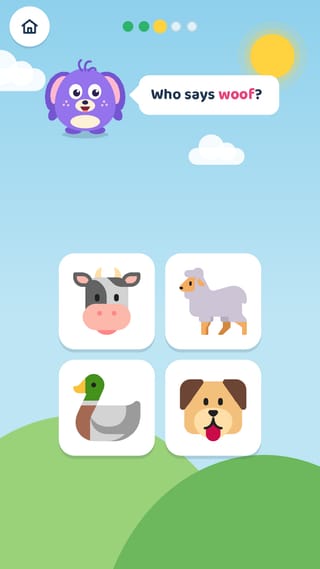

Colors, counting, animals, shapes · ages 2 and up
Learn with Fennu
Fennu, a cheerful lavender friend, teaches 8 colors, counting from 1 to 10, 10 animals and their sounds, and 6 shapes in short spoken lessons. Your child answers by tapping, so no reading is needed.
- Ages 2 and up
- Speaks English
- $0.99 once
- Android 7.0 or newer


What both games have in common
These are not promises you have to take on trust. Each one is shown on the game’s Google Play listing, and you can test the last few yourself in airplane mode.
No ads
No banners, no videos between levels and no rewarded ads. Neither listing carries a “Contains ads” label.
Nothing to buy inside
One payment of $0.99 in the US (local prices vary). No in-app purchases and no subscription to cancel.
No data collected
Both Google Play Data safety sections report no data collected and no data shared with third parties.
No internet needed
Everything is inside the download, so both play the same on a plane, in the car or in a waiting room.
No accounts or chat
No sign-in, no account to create and nobody for your child to talk to.
A calm place to stop
A Sticker Builder round ends when the picture is complete, and Fennu takes a nap after a few lessons.
Our guide to checking a kids app before you download it shows where each of these appears on a listing, so you can run the same checks on any app.
Who is behind Happylivia
Happylivia is the name under which Georges Sader, an independent developer based in Lebanon, publishes his games on Google Play. He designs, builds and tests both of them himself and answers the support email. There is no investor, no ad network and no data business behind them, which is why they can stay this simple.
Guides for parents
Unsponsored guides on choosing apps for young children, setting up a phone or tablet, and screen time. Each one lists its sources.
- How to check a kids app before you download it: ads, purchases, data and permissions
A two-minute check for any kids app on Google Play: the ads and purchases labels, Data safety, permissions, reviews, and red flags for under-8s.
- Free vs paid kids games: what “free” really costs, and when paying makes sense
How free, subscription and one-time-purchase kids apps make money, what each means for ads, data and offline play, and how to choose without overpaying.
- No-WiFi games for kids: offline apps and screen-free ideas for flights, cars and waiting rooms
Make sure games work with no internet before you leave, the best offline apps for ages 2 to 8, and screen-free ideas for planes, cars and waiting rooms.
- Puzzles by age: what to choose for children aged 2 to 8
How many puzzle pieces suit each age, which puzzle types fit ages 2 to 8, how to tell when a child is ready for harder ones, and what to look for in apps.
- What puzzles teach toddlers and preschoolers (and what they don’t)
The skills puzzles, matching and sticker games practise in children aged 2 to 5, what they don’t teach, and how to play along so it counts.
- How much screen time for kids? What the current guidance says, age by age
Screen time by age from the AAP’s 2026 policy statement and the WHO, for babies to 8 year olds, plus the 5 Cs and what matters more than minutes.